
Your online store should make it easy for customers to find and purchase the products they want. As more and more people use AI for shopping (also called agent commerce), it’s important to give AI shopping agents enough clear information so they can show your products to potential buyers.
Getting your products recommended by AI isn’t about having a big brand or spending a lot of money on advertising. AI assistants prefer stores that make it easy for them. If you provide clear, structured information, you have a better chance of reaching shoppers.
Let’s look at Answer Engine Optimization (AEO), which involves setting up your store so that AI tools can easily read and recommend your products.
If someone asks ChatGPT for a “cast iron skillet,” the AI will create a list of options. To do this, it checks websites for information that matches the customer’s request. If your store is on that list, you’ll reach someone who is ready to make a purchase.
AI models ignore your website design and focus on your data, but they don’t treat all content equally. There’s a sort of ‘trust hierarchy’ in place, so where you place your product data affects whether AI agents can use it.
- Structured data includes things like schema formatting, Merchant Center feeds, and product data fields. This information is created so that machines can read it directly. For example, a Product Schema field that says “compatible with: induction” helps AI agents match your product to someone looking for a cast iron skillet.
- Structured content is information organized in a way that is easy for AI to understand, such as specification tables, FAQ sections, or a bulleted “Materials and Maintenance” section. It is much easier for agents to read a clear table than to find details hidden in a paragraph.
- Unstructured marketing copy is the type of information that AI agents trust the least, so they can ignore it. For example, if you write, “Built to last generations in any kitchen,” the agent will have to guess what that means and probably won’t pair it with an induction-compatible skillet. Instead, use a clear specification such as: “Compatible with gas, electric and induction hobs.”
Here’s an example showing the difference between a regular marketing description and a marketing description structured for AEO.
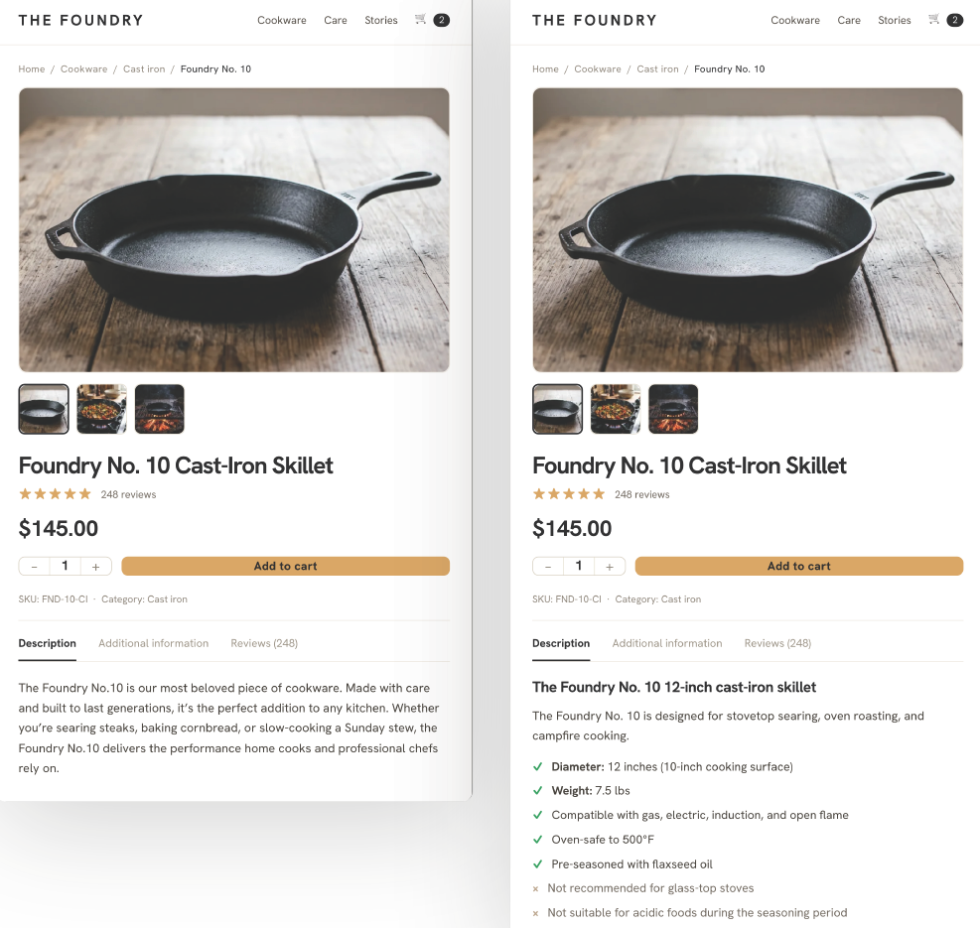
| For | After |
| The Foundry No.10 is our most beloved cookware. Carefully crafted and built to last for generations, it is the perfect addition to any kitchen. Whether you’re searing steaks, baking cornbread, or slow-cooking Sunday stew, the Foundry No.10 delivers the performance home cooks and professional chefs rely on. | #H2 The Foundry No. 10 12-inch cast iron skillet
The Foundry No. 10 is designed for stovetop searing, oven roasting and campfire cooking. – Diameter: 12 inches (10 inch cooking surface) |
The first version has no matching features, while the second has 8. If a customer asks for a “pre-seasoned 12-inch cast iron skillet that is induction compatible,” the second version matches on 3 points, but the first doesn’t match at all.
Tips for writing product descriptions
These recommendations can really help when writing product descriptions:
- Give the use case a name. “Designed for stovetop high-heat searing and oven-to-table cooking” rather than “Built for the modern kitchen.”
- Add negative qualifiers. ‘Not recommended for glass top stoves’ and ‘Not suitable for acidic foods during season’ allow agents to exclude your product from searches where it is a poor fit.
- Specify compatibility accuratelysuch as “compatible with gas, electric and induction hobs.” “Not compatible with glass top stoves” an agent gives clear information. “Works with most hobs” is a guess.
- Indicate for whom the product is intended. For example, let’s say it’s designed for home cooks who are switching from nonstick pans and want better heat retention when searing. More and more customers are now telling AI assistants things like “I’m a novice chef,” “I have an induction cooktop,” or “I need something that’s oven safe.” If your page names the audience, agents will receive additional information that fulfills these requests.
- The order is important. Start with the key features and then share the story. AI agents will read the top of your description first, while interested parties will keep reading for more details.
AI agents look at your entire store. Here are some key areas to focus on:
1. Category pages
Many category pages only show product grids and contain no useful text. Adding a short paragraph at the top that answers a question like “What to look for in a cast iron skillet” will give AI a summary of what you’re offering.
In WooCommerce you can add this in WP Admin under Products → Categoriesand then edit it Category description. It doesn’t have to be long: just a short paragraph about use cases, key specifications, and who the category is for.
2. Blocks with frequently asked questions
If you can’t fit all the product details into the main description, add FAQ blocks at the bottom of the page. For a cast iron frying pan, you can include questions such as: ‘Is this frying pan suitable for induction hobs?’ or “How do I season it for the first time?”
3. Policy Pages
Return policies, shipping times, and warranties are important trust signals for AI tools. Instead of hiding your terms in lengthy legal documents, use clear labels and precise numbers, such as “30-day return policy” or “shipped within 2 business days.”
4. Add an llms.txt file
Create a file called llms.txt and place it in the root directory of your site at yourdomain.com/llms.txt. This simple Markdown file gives AI agents a summary of what your store sells and where to find your most important pages. llms.txt helps certain AI tools quickly understand your business by highlighting relevant categories and pages, making it easier for them to match your store with customer queries.
Currently, Anthropic and Perplexity support reading llms.txt, but Google does not, so the benefits are limited to those AI platforms for now. While there’s no direct evidence yet that adding llms.txt will automatically increase how often your store is recommended by AIs, it’s a simple way to organize and clarify your information for systems that use it.
Here is an example of what the Markdown file should look like:
# Foundry Kitchen Co.
Online retailer specializing in cast-iron cookware, carbon steel pans, and cooking accessories for home cooks and professional kitchens.## Key pages
- (Shop all cast-iron skillets)(https://example.com/cast-iron-skillets/)
- (Carbon steel cookware)(https://example.com/carbon-steel/)
- (Seasoning and care guides)(https://example.com/care-guides/)
- (Shipping and returns)(https://example.com/shipping/)
- (About us)(
Upload the file to your root folder next to robots.txt. In WooCommerce you can do this quickly with FTP or a file manager.
If you use Yoast SEO or Rank Math, you don’t need FTP. Both added built-in llms.txt generation in 2025, starting with Yoast SEO version 22.0 and Rank Math version 1.4.0. Make sure you are using at least these versions to access the feature.
To check your version, go to the extensions page in your WordPress dashboard. Enable llms.txt generation in the dashboard and the file will be created and updated for you.
How do you know if it works?
Right now, there isn’t one perfect dashboard for tracking AI traffic, so you’ll need to do some manual checks:
1. Check your referral traffic for AI sources
In GA4 go to AcquisitionThan Traffic acquisitionand filter the Session Source on chat.openai.com, perplexity.ai and gemini.google.com. You may only see a few visits at first, so don’t get discouraged. Keep track of the numbers every month and see which product pages are visited.
2. Test it yourself
Each month, type a shopping query into ChatGPT or Perplexity that should show your products. Check if your store is recommended, see what competitors appear and note the reasons the AI gives for its choices.
3. Perform schema validation regularly
Go to search.google.com/test/rich-results, paste the URL of a product page, and check which schema types are found, whether they are valid, and whether there are any errors or missing fields. You can also use Google Search Console and look below Improvements in the left menu. If your schedule is detected, you will see a Products report display errors and warnings for your entire site.
The next best step is to choose your highest traffic product pages and see them through the eyes of a machine. If you discover gaps where technical details are missing, rewrite them in a clear bulleted list. You can even have an LLM (major language model, like ChatGPT) read through these pages and make their own recommendations, as these will be public.
Then view your highest traffic product pages as if you were an AI. If you notice any technical details missing, rewrite them in a clear list. You can also have an LLM review these pages and suggest improvements as the pages are public.
Start by looking at your 10 most visited product pages. For each, count how many matching features it contains, such as materials, size, weight, use case, target audience, compatibility, and any negative qualifiers. If there are less than five, AI agents may skip that page.
Once you have gathered this information, you can rewrite the product descriptions. Start with your highest traffic pages, check your AI referral sources after a month and adjust as necessary. When making changes, focus on including missing features, such as size, material, compatibility, or recommended use. Look for ways to make compatibility details more specific or define who the product is for. This way, every update you make helps AI agents tailor your products to customer needs more effectively.
Do you feel stuck with your ecommerce solution? Let’s talk.

Julia Callicrate leads Product Marketing at Woo, helping global companies discover new ways to scale their stores with the WooCommerce platform. Julia is a storyteller through and through and bridges the gap between products and customers. Before joining Woo, Julia worked for over ten years as a product manager and marketer in healthcare, banking and SaaS industries. She currently lives in Virginia with her family. Julia also has two cats that always show up during her video conferences.